The Problem
The legacy logic system at Discuss was a major source of operational risk—authored inside obstructive modals that blinded users to their survey structure, leading to frequent programming errors and data loss.
This project didn't start with a design request; it started with a forensic audit of our support volume. I discovered that 52.1% of all platform support tickets—over 1,100 high-priority cases annually—were rooted specifically in survey logic and branching friction. By mining this data, I identified that users weren't just struggling with the UI; they were "building blind," unable to visualize the complex respondent paths they were creating.
Identifying this massive support burden allowed me to lead a strategic overhaul of the entire logic authoring model. I moved the experience from a fragmented modal-based approach to a context-aware Sidebar and a Visual Flow View, acting as both the Lead Designer and the UX Engineer to ensure the new mental model was technically viable and resilient.
The Approach
Multi-Dimensional Discovery
I ran four parallel lines of inquiry: an analysis of 1,144 logic-related support tickets, stakeholder interviews with domain experts, and a competitive audit of 8 industry leaders (including Qualtrics, Typeform, and Forsta).
Cross-Functional Ideation
I facilitated a brainstorming workshop that generated 27 potential solutions. This multi-disciplinary collaboration was crucial to balancing the raw power needed by enterprise researchers with the intuitive interface required by new users.
Validating the Mental Model
My research revealed a massive "Conceptual Gap". Users were struggling with ambiguous terminology like "Skip" vs. "Branch". This led to the strategic decision to re-architect our logic nomenclature before ever touching the UI, ensuring the new system matched the user's mental model.
Risk Mitigation through Benchmarking
By analyzing competitors like Qualtrics, I identified that while "Survey Flows" are powerful, they often become unreadable at scale. This insight directly informed my decision to prioritize collapsible nodes and path-based filtering in our own Flow View.
The Solution
Rather than patching the legacy modal-based interface, I engineered a structural change to the logic-authoring model. The solution prioritizes context visibility and visual validation to eliminate the "blind building" that previously led to 52% of support tickets.
Engineering Collaboration
Throughout the process, I collaborated closely with the engineering team to validate technical feasibility — including the React Flow architecture decision, the swimlane layout algorithm, the condition data model, and the component API contracts for LogicSet and DiagramCanvas that would need to hold at design system scale. The POC was built not as a handoff artifact, but as a shared proof of technical and design direction, ensuring engineering alignment before any production commitment.
AI-Assisted Development
AI-assisted workflows using Claude and MCP-based tooling were structured as a pipeline: survey context, component conventions, and logic rule schemas were fed into the model as structured input, outputs were validated against the design system's token and component rules before being applied, and accepted artifacts fed directly into the Storybook documentation layer. This pipeline was central to compressing a complex implementation into a 2-week cycle and directly established the AI-native documentation workflows now built into the Foresight Design System's own infrastructure.
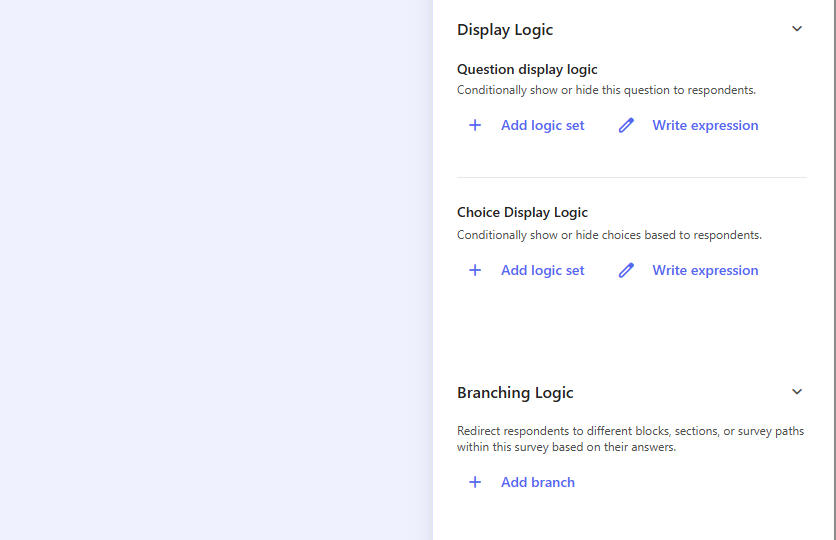
Rethinking the Survey Logic Experience
I replaced obstructive full-screen modals with a context-aware sidebar workflow, allowing researchers to author rules while keeping the questionnaire structure and variables fully visible. At the core of this transition is the LogicSet component, which features a responsive expansion mechanism—growing from 400px to 800px—to accommodate complex multi-condition rules without losing the global canvas view.
To ensure the system is both robust and performant, I implemented a validation layer that performs temporal consistency checks (preventing dependencies on future questions) and semantic contradiction detection (flagging impossible states like equal X AND not equal X). The architecture utilizes a pre-processed mapping system for $O(1) lookups during validation passes, supporting recursive AND/OR evaluation for Display, Hide, and Branching logic. Technically, LogicSet is a React component that orchestrates these deterministic states, managing UI focus and fluid transitions through an integrated onExpandSidebar callback.
All UI components — the LogicSet sidebar, condition rows, validation states, and DiagramCanvas — were built with system-readiness from the start: semantic tokens (--primary, --card, --border, --destructive) applied consistently across all states, component APIs designed as contracts rather than one-off implementations, and interaction states documented in Storybook with full coverage: Empty, Unconfirmed, Confirmed, Validation Error, and all four rule-type header patterns. This project was, in practice, the first production stress-test of the Foresight Design System's scalability — and the components held.
export const evaluateRule = (rule: LogicRule, responses: Record): boolean => {
  return rule.conditions.every(condition => {
    const value = responses[condition.variableId];
    switch (condition.operator) {
      case 'equals': return value === condition.value;
      case 'contains': return value?.includes(condition.value);
      default: return false;
    }
  });
};
The LogicSet and DiagramCanvas components are fully documented in the Foresight Design System — with all visual states, rule type variants, node types, and token mappings available in Storybook.
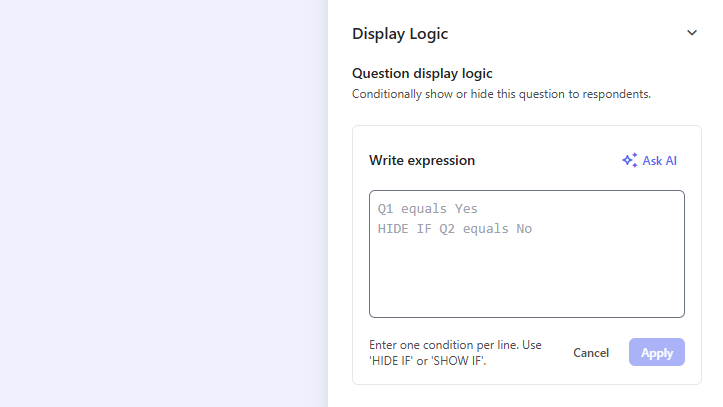
AI Logic Assistant
I introduced an AI-powered assistant directly in the logic authoring interface that helps users write survey flow logic expressions. By understanding context and suggesting appropriate logic patterns, it bridges the gap between non-technical users and complex logic syntax, preventing the common "invalid syntax" errors found in my audit.
The development of the AI Logic Assistant itself followed the same pipeline — prompt context included the logic rule schemas, operator vocabulary, and condition data model, ensuring the assistant's suggestions stayed within the system's established conventions rather than generating arbitrary syntax.
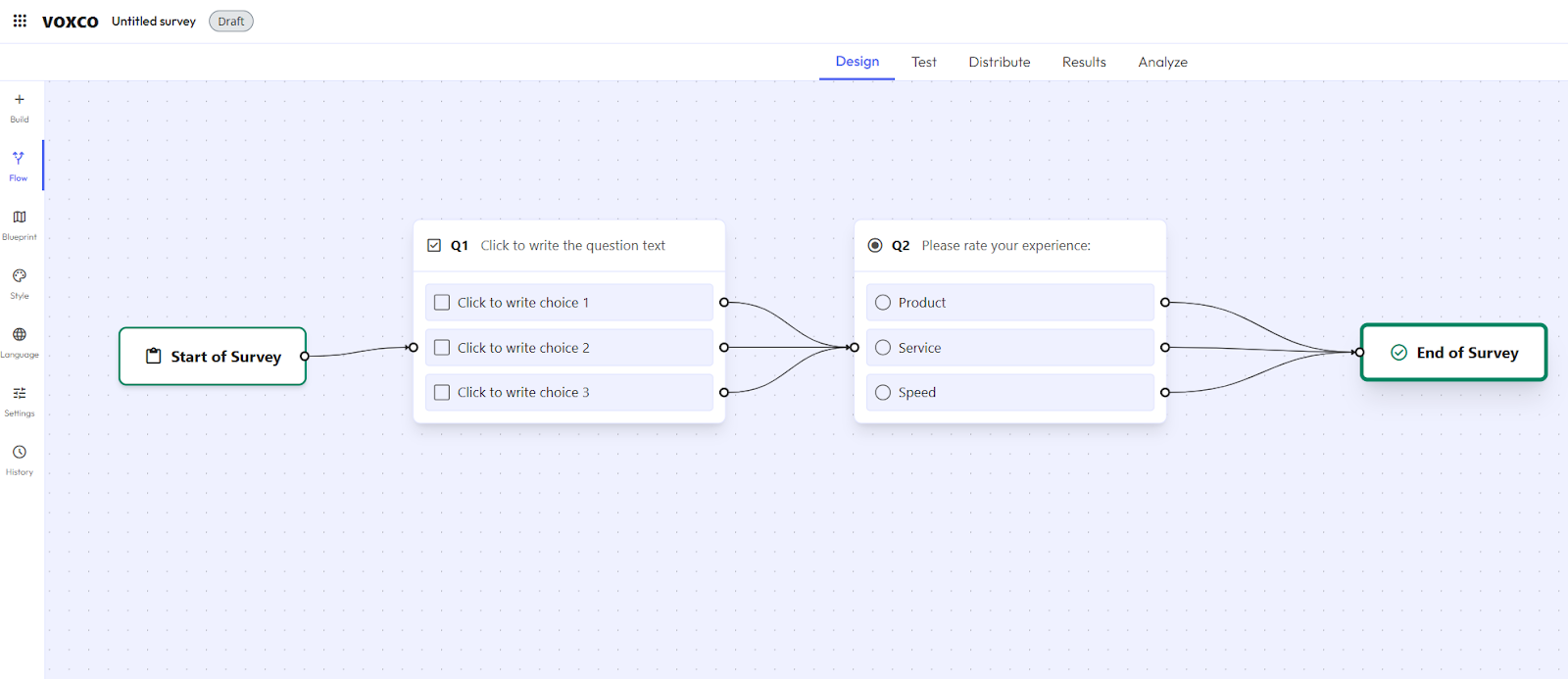
Diagram Canvas: Visual Branching Map
The Diagram Canvas transforms abstract conditional logic into a tangible respondent journey. Inspired by industry benchmarks like Qualtrics and Forsta, I engineered a graph-based visualization where each question is mapped as a node and every logic rule as a human-readable edge. By transitioning from static, linear lists to this bidirectional environment, I addressed the 'context blindness' responsible for 52% of support tickets, allowing researchers to identify structural risks—such as orphan blocks or infinite loops—at a glance. To achieve this level of precision, I engineered the canvas using React Flow as the rendering engine, driven by a custom orchestration layer where node positioning and edge derivation are computed deterministically from the survey state (the single source of truth).
Node Representation
Each question type (Single Choice, Text, Matrix) is a custom node component. I implemented specific visual states—selected, hasError, and isActive—to provide immediate feedback on the survey's health.
Semantic Edge Logic
I designed three distinct edge types to represent the product's logic architecture: Sequence (standard flow), Display Logic (conditional visibility), and Branching Logic (path-level routing). These edges are color-coded and labeled to make complex "if-this-then-that" rules human-readable.
Automatic Swimlane Layout
I developed a layout algorithm that detects fork points in the logic. When a survey branches, the canvas automatically organizes these paths into horizontal tracks (swimlanes), preventing edge crossing and maintaining clarity even with 100+ questions.
State Management & Interactivity
The canvas manages a complex fitView state that syncs with the Sidebar. Selecting a node on the canvas expands the Sidebar's edit panel, while updating a rule in the Sidebar triggers an immediate, animated recalculation of the visual edges on the canvas.
Outcomes
The rebuild is currently in its POC phase, but initial validation with power users and domain experts confirms that the "context-aware" shift has effectively addressed the core friction points.
Validation Results
During usability testing, power users expressed high levels of excitement regarding the Flow View, identifying it as a "must-have" feature for managing high-complexity surveys. One participant noted that they would use the visual branching map heavily to ensure accuracy in multi-path questionnaires. Internal validation also confirmed that the Display Logic / Branching Logic split was understood instantly, with users correctly identifying the two concepts with no prior training. Users successfully completed core logic creation workflows unassisted on their first attempt, describing the experience as "user-friendly" and significantly more intuitive than the legacy modal-based system.
Testing also confirmed that the In-Context Sidebar successfully solved the "context-blindness" problem. Users reported a much smoother flow, as they no longer needed to navigate away from their rules to reference variables or question order.
Projected Impact
Once launched to beta, the introduction of guardrails—including inline validation and improved status visibility—is projected to significantly reduce operational burden. We expect to decrease logic-related support tickets from 52.1% (1,144/year) to 35% or less, while also reducing the need for users to jump between interfaces to reference variables or question order.
Senior Learning
The most critical takeaway from the Survey Flow project was that technical complexity is often a byproduct of conceptual ambiguity. Initially, the project seemed to be about a "clunky UI," but my deep-dive research—including the audit of 1,144 support tickets—revealed that the primary friction point was actually misalignment in terminology. This taught me that as a Senior designer, I must be an investigator first: identifying that redefining nomenclature (like the Display vs. Branching split) can be a higher-leverage solution than any visual redesign.
Furthermore, the cross-functional workshop I facilitated proved that solving "spaghetti logic" isn't a solo design task. By bringing together Engineering, Support, and Product, we generated 27 distinct solutions and successfully prioritized them into a roadmap of "Quick Wins" and "Long-Term Investments". This collaborative approach didn't just yield better ideas; it created organizational buy-in for a massive 0→1 rebuild. I learned that my role as a Lead is to create the space for collective problem-solving, ensuring that we don't just build a "prettier" tool, but one that is architecturally and conceptually sound for the entire business.